
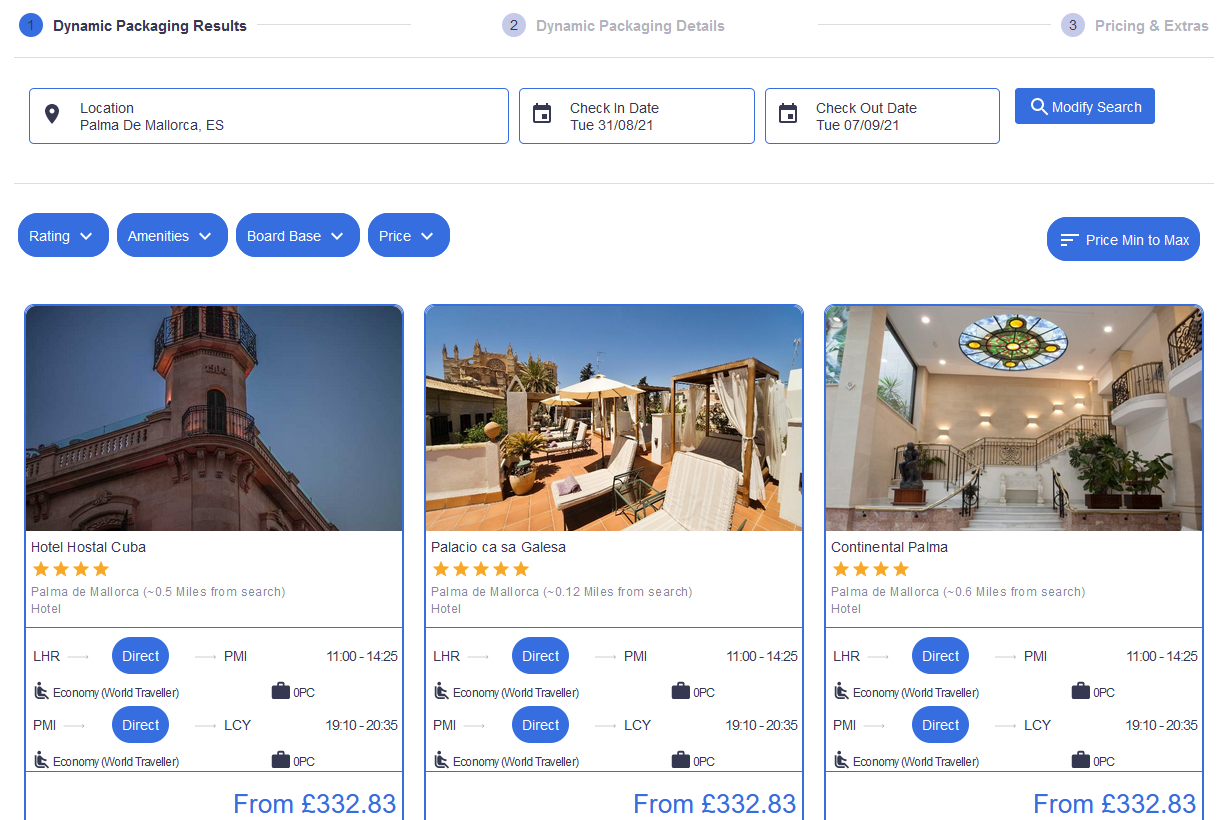
Our travel results widget lets you display 1000's of live flights, hotels and other travel products on your website, for your audience to research and book online.
The results widget is linked to your search box widgets, showing results for the search criteria the end user inputted in the previous step.
To understand the sequence of the booking flow, please read this article.
Create Your Travel Results Widget
1.
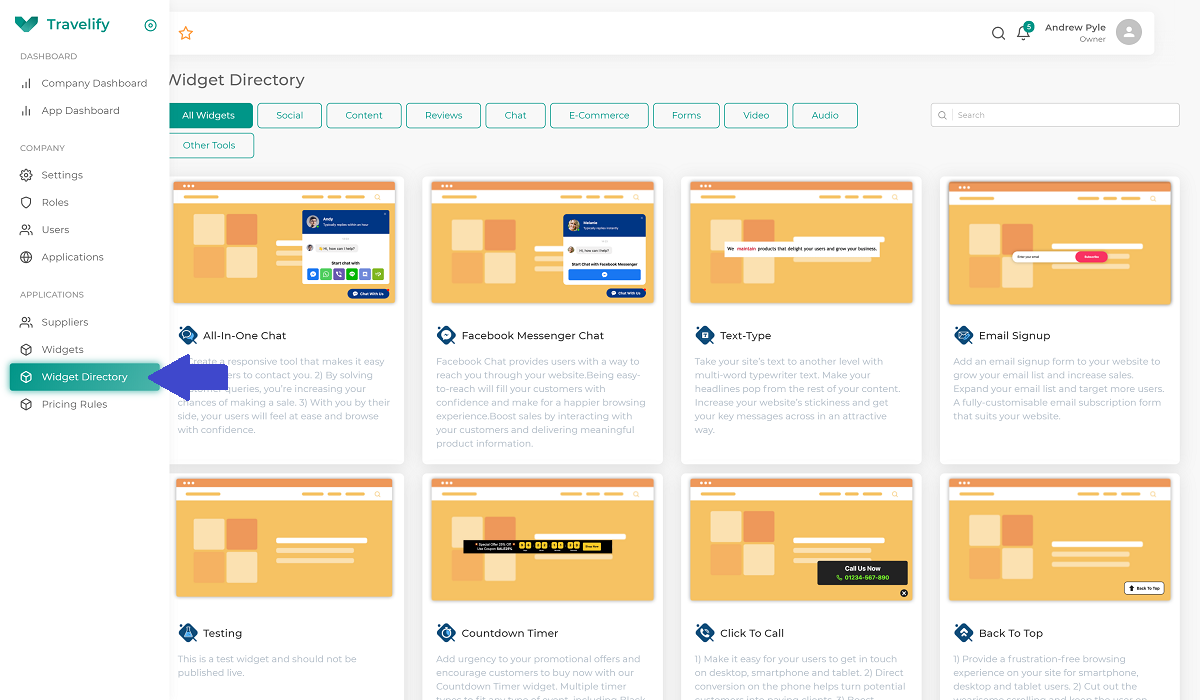
Log into your Travelify dashboard and click on Widget Directory from the side menu. Locate and click on the Travel Results widget, then click the Add New Widget button.
2.
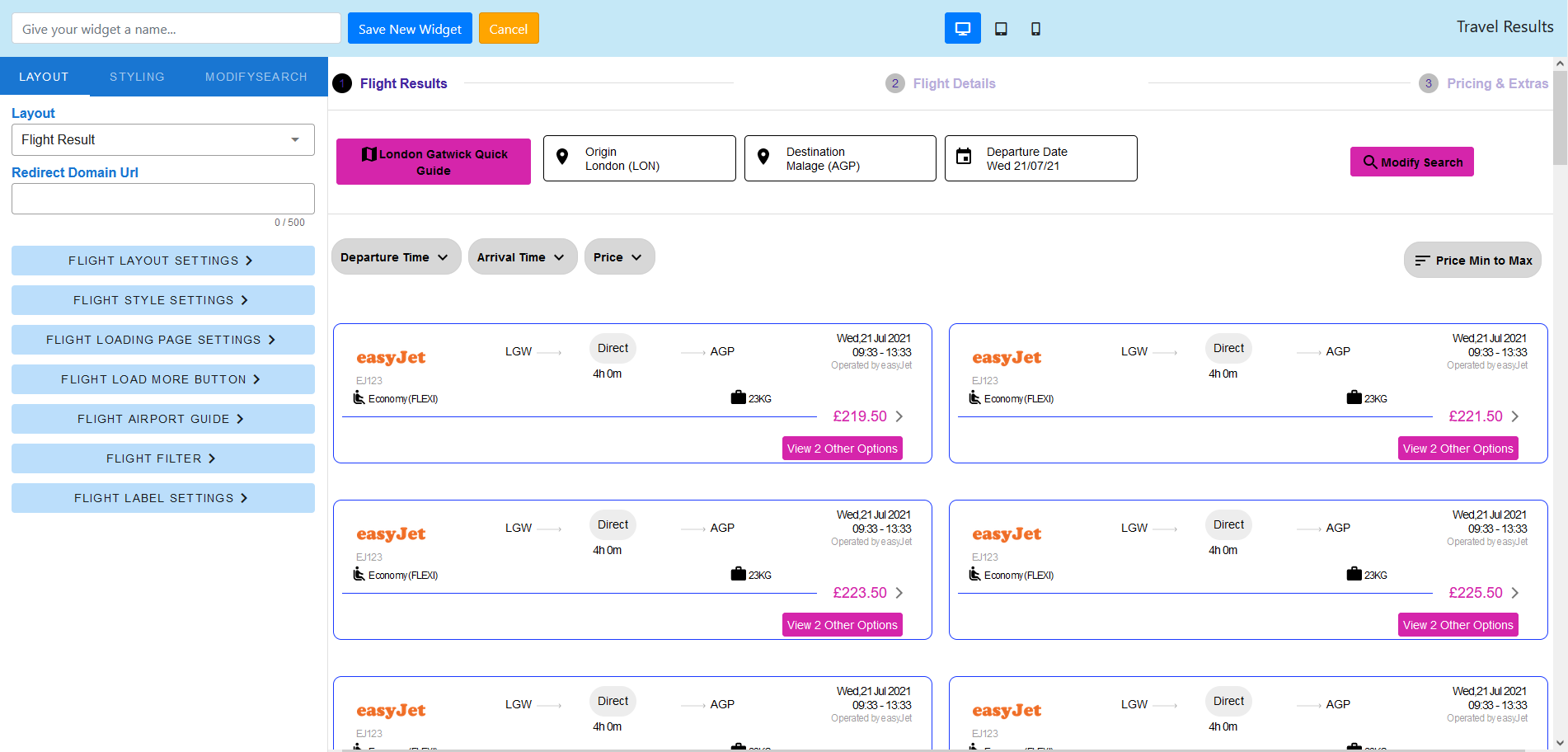
You will be presented with the widget editor that lets you customise the look of the widget and the way it works. Some settings will present additional configuration options as you go through the set up process.
Note: The layout, styling and configuration options are product specific. This means the widget can be configured specifically for flight results, hotel results, dynamic package results etc.
These are the configuration options available to you under Layout in the header of the side menu.
- Layout
- Flight Result
- Redirect Domain URL (Input the URL of the "Extras" page on your website. Learn more here)
- Open New Window For Pricing and Extras Page - On/Off
- Agent View Enabled - On/Off (Reveals the Agent functionality on the results page)
- Login Page URL (Input the URL of the Agent login page, if you have Agent View Enabled)
- Flight Layout Settings
- Layout
- Flight Results - One Way
- Template (Choose from multiple templates)
- Filter Template (Select the position of the results filter on the page)
- Filter menu collapsed - On/Off (Show or hide the results filters)
- Desktop columns (Select how many columns for the results to display)
- Desktop spacing between members (Space between the columns)
- Enable Load More Button - On/Off
- Enable airline matrix grid - On/Off
- Enable flexible date grid - On/Off
- Booking deposit enabled - On/Off
- Enable quick guide button - On/Off
- Show total price - On/Off
- Error Message (Input a message to display when no one way flight results are found)
- Flight Pricing Page Error Message (Input a message to display when pricing for a specific flight is not available)
- Flight Results - Return
- Template (Choose from multiple templates)
- Filter Template (Select the position of the results filter on the page)
- Filter menu collapsed - On/Off (Show or hide the results filters)
- Desktop columns (Select how many columns for the results to display)
- Desktop spacing between members (Space between the columns)
- Enable Load More Button - On/Off
- Enable airline matrix grid - On/Off
- Enable flexible date grid - On/Off
- Booking deposit enabled - On/Off
- Enable quick guide button - On/Off
- Show total price - On/Off
- Error Message (Input a message to display when no one way flight results are found)
- Flight Pricing Page Error Message (Input a message to display when pricing for a specific flight is not available)
- Flight Results - Multi City
- Template (Choose from multiple templates)
- Filter Template (Select the position of the results filter on the page)
- Filter menu collapsed - On/Off (Show or hide the results filters)
- Desktop columns (Select how many columns for the results to display)
- Desktop spacing between members (Space between the columns)
- Enable Load More Button - On/Off
- Enable airline matrix grid - On/Off
- Enable flexible date grid - On/Off
- Booking deposit enabled - On/Off
- Enable quick guide button - On/Off
- Show total price - On/Off
- Error Message (Input a message to display when no one way flight results are found)
- Flight Pricing Page Error Message (Input a message to display when pricing for a specific flight is not available)
- Flight Results - One Way
- Layout
- Flight Loading Page Settings
- Add Block
- Loader Style (The animation that appears on the results loading page)
- Loading options
- Spinning circle
- Loader bar
- Upload image (You can upload an animated file like .GIF to display a custom animation)
- Loading options
- Title text
- Title (The title copy that your visitors see on the loading page)
- Font size
- Font colour
- Font style
- Description text
- Enter descriptions (The description text that your visitors see on the loading page)
- Font size
- Font colour
- Font style
- Show Search Criteria (The visitors search criteria they see on the loading page)
- Font size
- Font colour
- Font style
- Images
- Upload an image to display on the loading page
- Spacer
- Spacer height ( To introduce a spacer to the loading page)
- Loader Style (The animation that appears on the results loading page)
- Loading Page Background Colour
- Loading Page Background Border Colour
- Loading Page Background Border (Thickness of the border)
- Loading Page Background Border Radius (Rounder corners on the border)
- Add Block
- Flight Style Settings
- Stop Info Button Background Colour
- Stop Info Button Border Radius
- Stop Info Button Padding
- Stop Info Text Colour
- Stop Info Text Size
- Stop Info Text Style
- Airline Logo Width
- Pricing Background Colour
- View More Option Title Font Size (px)
- View More Option Title Font Colour
- View More Option Title Text Style
- View More Option Tab Font Size (px)
- View More Option Tab Font Colour
- View More Option Tab Text Style
- View More Option Tab Background Colour
- View More Option Tab Padding (px)
- View More Option Tab Bottom Radius (px)
- View More Option Tab Bottom Radius Colour
- Flight Airport Guide
- Airport Guide Popup Background Colour
- Airport Guide Popup Title Font Size (px)
- Airport Guide Popup Font Size (px)
- Airport Guide Popup Border Colour
- Airport Guide Popup Border
- Airport Guide Popup Border Radius
- Airport Guide Popup Size (%)
- Airport Guide Popup Text Colour
- Airport Guide Popup Active Tab Colour
- Flight Airline Matrix Styles
- Box Background Colour
- Box Border Colour
- Airline Active and Hover Colour
- Left and Right Box Background Colour
- Left and Right Arrow Colour
- Font Colour
- Text Size (px)
- Text Style
- Cheapest Background Colour
- Cheapest Border Radius
- Cheapest Padding
- Cheapest Text Colour
- Cheapest Text Size )px)
- Cheapest Text Style
- Flight Flexible Dates Styles
- Box Background Colour
- Box Border Colour
- Active and Hover Colour
- Font Colour
- Text Size (px)
- Text Style
- Cheapest Background Colour
- Cheapest Border Radius
- Cheapest Padding
- Cheapest Text Colour
- Cheapest Text Size )px)
- Cheapest Text Style
- Location Settings
- Origins Type
- Autocomplete (All locations)
- Dropdown (Fixed Locations)
- Add Origin Group
- Add Group Title
- Add Origin Location
- Add Group Title
- Add Origin Group
- Destinations Type
- Add Destination Group
- Add Group Title
- Add Destination Location
- Add Group Title
- Add Destination Group
- Origins Type
- Flight Label Settings
- Quick Airports Guide Label Text
- Stops Filter Label Text
- Flight Options Arrival Time Label Text
- Flight Options Departures Time Label Text
- Flight Options Arrival Airports Label Text
- Flight Options Departures Airports Label Text
- Airlines Filter Label Text
- Price Filter Label Text
- Sorting Label Text
- Search Label Text
- Modify Search Label Text
- Cancel Button Label Text
- OK Button Label Text
- Open Filter Label Text
- Close Button Label Text
- Flight Options Close Button Label Text
- Flight Options Confirm Button Label Text
- Book Button Label Text
- Per Person Label Text
- Filter Label Text
- Airline Matrix Label Fr Text
- Flexible Dates Label Fr Text
- Cheapest Label Fr Text
- Flexible Departure Date Label
- Deposit Pretext Label
- Deposit Posttext Label
- Deposit Payment Heading Label
- Layover Time Label
- Total Journey Time Label
- Accommodation Result
- Accommodation Layout Settings
- Template
- Template 1
- Template
- Filter Template (Select the position of the results filter on the page)
- Filter menu collapsed - On/Off (Show or hide the results filters)
- Desktop columns (Select how many columns for the results to display)
- Desktop spacing between members (Space between the columns)
- Tablet Columns
- Tablet Spacing Between Members
- Mobile Columns
- Mobile spacing between members
- Nightly pricing enabled - On/Off
- Enable Load More Button - On/Off
- Number of accommodation per load
- Load more text
- Enable Start Rating Matrix Grid - On/Off
- Rating Matrix Nightly Price Enabled - On/Off
- Booking Deposit Enabled - On/Off
- Enable Quick Guide Button
- Error Message
- Template
- Accommodation City Guide
- City Guide Popup Background Colour
- City Guide Popup Title Font Size (px)
- City Guide Popup Font Size (px)
- City Guide Popup Border Colour
- City Guide Popup Border
- City Guide Popup Border Radius
- City Guide Popup Size (%)
- City Guide Popup Text Colour
- City Guide Popup Active Tab Colour
- Location Settings
- Origins Type
- Autocomplete (All locations)
- Dropdown (Fixed Locations)
- Add Origin Group
- Add Group Title
- Add Origin Location
- Add Group Title
- Add Origin Group
- Destinations Type
- Add Destination Group
- Add Group Title
- Add Destination Location
- Add Group Title
- Add Destination Group
- Origins Type
- Accommodation Style Settings
- Faretype Info Button Background Colour
- Faretype Info Button Border Radius
- Faretype Info Button Padding
- Faretype Info Text Colour
- Faretype Info Text Size (px)
- Faretype Info Text Style
- Package Detail Summary Section Border Size (px)
- Package Detail Summary Section Border Colour
- Map Icons Size (px)
- Accommodation Loading Page Settings
- Add Block
- Loader Style (The animation that appears on the results loading page)
- Loading options
- Spinning circle
- Loader bar
- Upload image (You can upload an animated file like .GIF to display a custom animation)
- Loading options
- Title text
- Title (The title copy that your visitors see on the loading page)
- Font size
- Font colour
- Font style
- Description text
- Enter descriptions (The description text that your visitors see on the loading page)
- Font size
- Font colour
- Font style
- Show Search Criteria (The visitors search criteria they see on the loading page)
- Font size
- Font colour
- Font style
- Images
- Upload an image to display on the loading page
- Spacer
- Spacer height ( To introduce a spacer to the loading page)
- Loader Style (The animation that appears on the results loading page)
- Loading Page Background Colour
- Loading Page Background Border Colour
- Loading Page Background Border (Thickness of the border)
- Loading Page Background Border Radius (Rounder corners on the border)
- Add Block
- Accommodation Rating Matrix Styles
- Box Background Colour
- Box Border Colour
- Active & Hover Colour
- Star Rating Colour
- Star Rating Size (px)
- Font Colour
- Text Size (px)
- Text Style
- Accommodation Detail Settings
- Hotel detail popup background colour
- Hotel detail popup border colour
- Hotel detail popup border
- Hotel detail popup border radius
- Hotel details popup size (%)
- Hotel detail popup title font size (%)
- Hotel detail popup title text colour
- Hotel detail popup title text style
- Hotel detail popup font size (px)
- Hotel detail popup text colour
- Price text colour
- Price text size (px)
- Price text style Price text style
- Price includes heading text colour
- Price includes heading text style
- Detail tab border (px)
- Detail tab border radius (px)
- Detail tab border radius (px)
- Detail tab border colour
- Detail tab background colour
- Detail tab text colour
- Detail tab text size (px)
- Detail tab text style
- Detail tab padding
- Detail tab active colour
- Hotel information heading text colour
- Hotel information heading text size (px)
- Hotel information heading text style
- Hotel overview heading text colour
- Hotel overview heading text size (px)
- Hotel overview heading text style
- Detail heading text colour
- Detail heading text size (px)
- Detail heading text style
- Detail summary text colour
- Detail summary text size (px)
- Detail summary text style
- Detail summary icon colour
- Price listing tab border radius (px)
- Price listing tab border colour
- Price listing tab background colour
- Price listing tab text colour
- Price listing tab text size (px)
- Price listing tab text style
- Price listing tab padding
- Price listing tab active colour
- Room border (px)
- Room border radius (px)
- Room border colour
- Room background colour
- Room heading text colour
- Room heading text size (px)
- Room heading text style
- Room option column heading text colour
- Room option column heading text size
- Room option column heading text style
- Room summary text colour
- Room summary text size (px)
- Room summary text style
- Room option heading colour
- Room option heading text style
- Room option summary colour
- Room option summary text size (px)
- Room option summary text style
- Room option border radius (px)
- Room option border colour
- Room option background colour
- Room option active border colour
- Passenger info tooltip border radius (px)
- Passenger info tooltip background colour
- Passenger info tooltip text colour
- Passenger info tooltip text size (px)
- Passenger info tooltip text style
- View rate information text colour
- View rate information text colour
- View rate information text size (px)
- View rate information text style
- Search information text colour
- Search information text size (px)
- Search information text style
- Accommodation View On Map Settings
- Nightly price enabled - On/Off
- View on map box height (px)
- View on map border radius (px)
- View on map marker pin background colour
- View on map marker pin text colour
- View on map marker pin text size (px)
- View on map active marker pin text size (px)
- View on map active marker pin background colour
- View on map active marker pin text colour
- View on map button background colour
- View on map button text colour
- View on map button text size (px)
- View on map button text style
- View on map box border colour
- Accommodation Label Settings
- Quick Guide Label Text
- Quick Guide Walkscore Label Text
- Quick Guide See More Label Text
- Quick Guide Summary Label Text
- Quick Guide Point of Interest Label Text
- Quick Guide POI Name Label Text
- Quick Guide POI Summary Label Text
- Quick Guide POI Description Label Text
- Property Type Filter Label Text
- Payment Type Label Text
- Amenities Filter Label Text
- Board Base Filter Label Text
- Price Filter Label Text
- Sorting Label Text
- Search Label Text
- Modify Search Label Text
- Cancel Button Label Text
- Ok Button Label Text
- Open Filter Label Text
- Close Button Label Text
- Guest Rating Filter Label Text
- See Details Label Text
- Refundable Label Text
- Non Refundable Label Text
- Rooms Label Text
- From Label Text
- Location Label Text
- Check In Label Text
- Check Out Label Text
- Overview Label Text
- Rooms Label Text
- Hotel Information Label Text
- Hotel Information Overview Label Text
- Facilities Label Text
- Total Price Label Text
- Per Night Price Label Text
- Sleeps Label Text
- Price Label Text
- Room Information Label Text
- Quantity Label Text
- Selected Label Text
- Total Price From Label Text
- Per Night Text
- Price Includes Text
- View More Rate Information Text
- View Less Rate Information Text
- Filter Label Text
- Price info Label Text
- Total Price in List
- Search Hotels
- Reset
- Enter Hotel Name
- Rating Matrix From Label
- Rating Matrix From Label
- Deposit Pretext Label
- Deposit Posttext Label
- Deposit Payment Heading Label
- Flexible Dates Label Fr Text
- Cheapest Label Fr Text
- Flexible Departure Date Label
- Accommodation Layout Settings
- Car Rental Result
- Location Settings
- Origins Type
- Autocomplete (All locations)
- Dropdown (Fixed Locations)
- Add Origin Group
- Add Group Title
- Add Origin Location
- Add Group Title
- Add Origin Group
- Destinations Type
- Add Destination Group
- Add Group Title
- Add Destination Location
- Add Group Title
- Add Destination Group
- Origins Type
- Car Rental Layout Settings
- Filter template
- Top
- Left
- Right
- Filter menu collapsed - On/Off
- Desktop columns
- Enable load more button - On/Off
- Number of car load per page
- Load more text
- Car rental error message
- Car pricing page error message
- Filter template
- Car loading page settings
- Add Block
- Loader Style (The animation that appears on the results loading page)
- Loading options
- Spinning circle
- Loader bar
- Upload image (You can upload an animated file like .GIF to display a custom animation)
- Loading options
- Title text
- Title (The title copy that your visitors see on the loading page)
- Font size
- Font colour
- Font style
- Description text
- Enter descriptions (The description text that your visitors see on the loading page)
- Font size
- Font colour
- Font style
- Show Search Criteria (The visitors search criteria they see on the loading page)
- Font size
- Font colour
- Font style
- Images
- Upload an image to display on the loading page
- Spacer
- Spacer height ( To introduce a spacer to the loading page)
- Loader Style (The animation that appears on the results loading page)
- Loading Page Background Colour
- Loading Page Background Border Colour
- Loading Page Background Border (Thickness of the border)
- Loading Page Background Border Radius (Rounder corners on the border)
- Add Block
- Car Rental Airport Guide
- Quick Car Guide Popup Background Colour
- Quick Car Guide Popup Title Font Size (px)
- Quick Car Guide Popup Font Size (px)
- Quick Car Guide Popup Size (%)
- Quick Car Guide Popup Border Colour
- Quick Car Guide Popup Border
- Quick Car Guide Popup Border Radius
- Quick Car Guide Popup Text Colour
- Quick Car Guide Popup Active Tab Colour
- Car Rental Label Settings
- Quick Car Guide Label Text
- Modify Car Label Text
- Price Filter Label Text
- Transmission Filter Label Text
- Fuel Type Filter Label Text
- Package Inclusions Filter Label Text
- Features Filter Label Text
- Airport Location Filter Label Text
- Sorting Label Text
- Vehicle Details Label Text
- Rate Details Label Text
- Cancel Button Label Text
- Ok Button Label Text
- Open Filter Label Text
- Close Button Label Text
- Book Now Button Label Text
- Package Name Label Text
- Package Section Price Label Text
- Package Section Inclusions Label Text
- Package Section Name Label Text
- Package Section Description Label Text
- Sorting Section Priority Label Text
- Pickup Location Name Label Text
- Dropoff Location Name Label Text
- Start Time Label Text
- End Time Label Text
- Pickup Name Label Text
- DropOff Name Label Text
- Address Label Text
- City Label Text
- Number Of Passengers Text
- Doors Text
- Small Luggage Text
- Large Luggage Text
- On Airport Text
- Vehicle Text
- Included for Free Text
- Filter Label Text
- Operator Label Text
- Location Settings
- Transfer Result
- Filter template
- Top
- Left
- Right
- Filter menu collapsed - On/Off
- Desktop columns
- Desktop spacing between members
- Tablet columns
- Tablet spacing between members (px)
- Enable load more button - On/Off
- Number of transfers per load
- Load more text
- Error message
- Location Settings
- Origins Type
- Autocomplete (All locations)
- Dropdown (Fixed Locations)
- Add Origin Group
- Add Group Title
- Add Origin Location
- Add Group Title
- Add Origin Group
- Destinations Type
- Add Destination Group
- Add Group Title
- Add Destination Location
- Add Group Title
- Add Destination Group
- Origins Type
- Transfer style settings
- Detail inside borders colour
- Detail inside borders (px)
- Transfer loading page settings
- Add Block
- Loader Style (The animation that appears on the results loading page)
- Loading options
- Spinning circle
- Loader bar
- Upload image (You can upload an animated file like .GIF to display a custom animation)
- Loading options
- Title text
- Title (The title copy that your visitors see on the loading page)
- Font size
- Font colour
- Font style
- Description text
- Enter descriptions (The description text that your visitors see on the loading page)
- Font size
- Font colour
- Font style
- Show Search Criteria (The visitors search criteria they see on the loading page)
- Font size
- Font colour
- Font style
- Images
- Upload an image to display on the loading page
- Spacer
- Spacer height ( To introduce a spacer to the loading page)
- Loader Style (The animation that appears on the results loading page)
- Loading Page Background Colour
- Loading Page Background Border Colour
- Loading Page Background Border (Thickness of the border)
- Loading Page Background Border Radius (Rounder corners on the border)
- Add Block
- Transfer Label Settings
- Vehicle Name Filter Label Text
- Vehicle Type Label Text
- Transfer provider Label Text
- Price Filter Label Text
- Sorting Label Text
- Search Label Text
- Modify Search Label Text
- Cancel Button Label Text
- Ok Button Label Text
- Open Filter Label Text
- Book Now Label Text
- Transfers Provided By Text
- Estimated Journey Time Text
- Number Of Passengers Text
- Luggage Allowance Text
- More Information Text
- Less Information Text
- Pickup Location Name Label Text
- Dropoff Location Name Label Text
- Start Time Label Text
- End Time Label Text
- Filter Label Text
- Filter template
- Airport & Extras
- Location Settings
- Origins Type
- Autocomplete (All locations)
- Dropdown (Fixed Locations)
- Add Origin Group
- Add Group Title
- Add Origin Location
- Add Group Title
- Add Origin Group
- Destinations Type
- Add Destination Group
- Add Group Title
- Add Destination Location
- Add Group Title
- Add Destination Group
- Origins Type
- Airport & Extra Layout Settings
- Result Types Settings
- Add Block
- Lounge
- Parking
- Hotel
- Hotel with parking
- FastTrack
- Add Block
- Filter template
- Top
- Left
- Right
- Filter menu collapsed - On/Off
- Desktop columns
- Desktop spacing between members (px)
- Tablet columns
- Tablet spacing between members (px)
- Airport and extra result error message
- Airport and extra pricing page error message
- Result Types Settings
- Airport & Extra Style Settings
- Heading Font Size (px)
- Heading Font Colour
- Heading Font Style
- Heading Background Colour
- Heading Border Radius(px)
- Heading Padding(px)
- Map,Info,Photo Area Background Colour
- Map,Info,Photo Text Colour
- Map,Info,Photo Text Size (px)
- Map,Info,Photo Font Style
- Free Cancellation Section Background Colour
- Free Cancellation Section Border Radius(px)
- Free Cancellation Section Padding(px)
- Free Cancellation Section Text Colour
- Free Cancellation Section Text Size (px)
- Free Cancellation Section Text Style
- Map,Info,Photos Popup Size (%)
- Map,Info,Photos Popup Background Colour
- Map,Info,Photos Popup Border Colour
- Map,Info,Photos Popup Border
- Map,Info,Photos Popup Border Radius
- Map,Info,Photos Popup Text Colour
- Map,Info,Photos Popup Heading Font Size (px)
- Map,Info,Photos Popup Heading Text Style
- Map,Info,Photos Popup Title Font Size (px)
- Map,Info,Photos Popup Description Font Size (px)
- Map,Info,Photos Popup Tab Border Colour
- Map,Info,Photos Popup Tab Border
- Map,Info,Photos Popup Active Tab Colour
- Map,Info,Photos Popup Tab Text Font Size (px)
- Map,Info,Photos Popup Tab Active Text Colour
- Map,Info,Photos Popup Tab Border Radius (px)
- Airport & Extra loading page settings
- Add Block
- Loader Style (The animation that appears on the results loading page)
- Loading options
- Spinning circle
- Loader bar
- Upload image (You can upload an animated file like .GIF to display a custom animation)
- Loading options
- Title text
- Title (The title copy that your visitors see on the loading page)
- Font size
- Font colour
- Font style
- Description text
- Enter descriptions (The description text that your visitors see on the loading page)
- Font size
- Font colour
- Font style
- Show Search Criteria (The visitors search criteria they see on the loading page)
- Font size
- Font colour
- Font style
- Images
- Upload an image to display on the loading page
- Spacer
- Spacer height ( To introduce a spacer to the loading page)
- Loader Style (The animation that appears on the results loading page)
- Loading Page Background Colour
- Loading Page Background Border Colour
- Loading Page Background Border (Thickness of the border)
- Loading Page Background Border Radius (Rounder corners on the border)
- Add Block
- Airport & Extra Filter Styles
- Background Colour
- Background Menu Colour
- Border Radius
- Border
- Border Colour
- Padding
- Text Colour
- Text Size (px)
- Text Style
- Button Colour
- Button Border Radius
- Button Padding
- Button Text Colour
- Button Text Size (px)
- Button Text Style
- Button Border
- Button Border Colour
- Heading Text Colour
- Heading Text Size (px)
- Heading Text Style
- Filter Active Background Colour
- Checkbox/Radio Button Background Colour
- Checkbox/Radio Button Background Hover Colour
- Filter Text Size (px)
- Filter Text Style
- Dropdown Background Colour
- Dropdown Border Colour
- Dropdown Border
- Dropdown Border Radius
- Dropdown Desktop Size
- Slider Colour
- Card Item Menu Title Font Size(px)
- Card Item Menu Text Font Size(px)
- Airport & Extra Label Settings
- Price Filter Label Text
- Service Type Filter Label Text
- Airport Type Filter Label Text
- Features Filter Label Text
- Inclusions Filter Label Text
- Item Label Text
- Items Label Text
- Info Label Text
- Map Label Text
- Book Now Label Text
- Show Packages Label Text
- Back To Overview Label Text
- Added to Basket Label Text
- Photo Label Text
- Sorting Label Text
- Search Label Text
- Modify Search Label Text
- Cancel Button Label Text
- Ok Button Label Text
- Open Filter Label Text
- Origin Name Label Text
- Destination Name Label Text
- Outbound Flight Time Label Text
- Return Flight Depart Time Label Text
- Return Flight Arrival Time Label Text
- Hotel Packages Label Text
- Included Features Label Text
- No Items Added Label Text
- Connected To Label Text
- Terminal Label Text
- Free Cancellation Label Text
- Hotel Packages From Label Text
- Filter Label Text
- Quick Guide Label Text
- Lounge Label Text(For Heading & Filter Text)
- Parking Label Text(For Heading & Filter Text)
- Hotel Label Text(For Heading & Filter Text)
- Hotel With Parking Label Text(For Heading & Filter Text)
- Fast Track Label Text(For Heading & Filter Text)
- Location Settings
- Dynamic Package
- Dynamic Package Layout Settings
- Template
- Template 1
- Template 2
- Filter Template
- Top
- Left
- Right
- Filter Menu Collapsed - On/Off
- Desktop Columns
- Desktop Spacing Between Members (px)
- Tablet Columns
- Tablet Spacing Between Members (px)
- Show Flight Information - On/Off
- Enable Load More Button - On/Off
- Number Of Dynamic Packaging Per Load
- Load More Text
- Enable Star Rating Matrix Grid - On/Off
- Enable Airline Matrix Grid - On/Off
- Booking Deposit Enabled - On/Off
- Enable Quick Guide Button - On/Off
- Show Total Price - On/Off
- Flexible Options
- Do not display flexible date grid/calendar
- Display 7-day flexibility grid
- Error Message
- Template
- Dynamic Package City Guide
- City Guide Popup Background Colour
- City Guide Popup Title Font Size (px)
- City Guide Popup Font Size (px)
- City Guide Popup Border Colour
- City Guide Popup Border
- City Guide Popup Border Radius
- City Guide Popup Size (%)
- City Guide Popup Text Colour
- City Guide Popup Active Tab Colour
- City Guide Popup Summary and Description Font Size (px)
- Location Settings
- Location Settings
- Origins Type
- Autocomplete (All locations)
- Dropdown (Fixed Locations)
- Add Origin Group
- Add Group Title
- Add Origin Location
- Add Group Title
- Add Origin Group
- Destinations Type
- Add Destination Group
- Add Group Title
- Add Destination Location
- Add Group Title
- Add Destination Group
- Origins Type
- Location Settings
- Dynamic Package Style Settings
- Package Detail Summary Section Border Size (px)
- Package Detail Summary Section Border Colour
- Faretype Info Button Background Colour
- Faretype Info Button Border Radius
- Faretype Info Button Padding
- Faretype Info Text Colour
- Faretype Info Text Size (px)
- Faretype Info Text Style
- Dynamic Package Loading Page Settings
- Add Block
- Loader Style (The animation that appears on the results loading page)
- Loading options
- Spinning circle
- Loader bar
- Upload image (You can upload an animated file like .GIF to display a custom animation)
- Loading options
- Title text
- Title (The title copy that your visitors see on the loading page)
- Font size
- Font colour
- Font style
- Description text
- Enter descriptions (The description text that your visitors see on the loading page)
- Font size
- Font colour
- Font style
- Show Search Criteria (The visitors search criteria they see on the loading page)
- Font size
- Font colour
- Font style
- Images
- Upload an image to display on the loading page
- Spacer
- Spacer height ( To introduce a spacer to the loading page)
- Loader Style (The animation that appears on the results loading page)
- Loading Page Background Colour
- Loading Page Background Border Colour
- Loading Page Background Border (Thickness of the border)
- Loading Page Background Border Radius (Rounder corners on the border)
- Add Block
- Dynamic Packaging Star Rating Matrix
- Box Background Colour
- Box Border Colour
- Active And Hover Colour
- Star Rating Colour
- Star Rating Size(px)
- Font Colour
- Text Size (px)
- Text Style
- Dynamic Packaging Airline Matrix
- Box Background Colour
- Box Border Colour
- Airline Active And Hover Colour
- Left And Right Box Background Colour
- Left And Right Arrow Colour
- Font Colour
- Text Size (px)
- Text Style
- Dynamic Packaging Detail Settings
- Hotel Detail Popup Background Colour
- Hotel Detail Popup Border Colour
- Hotel Detail Popup Border
- Hotel Detail Popup Border Radius
- Hotel Detail Popup Size (%)
- Hotel Detail Popup Title Font Size (px)
- Hotel Detail Popup Title Text Colour
- Hotel Detail Popup Title Text Style
- Hotel Detail Popup Font Size (px)
- Hotel Detail Popup Text Colour
- Price Text Colour
- Price Text Size (px)
- Price Text Style
- Price Includes Heading Text Colour
- Price Includes Heading Text Size (px)
- Price Includes Heading Text Style
- Detail Tab Border (px)
- Detail Tab Border Radius (px)
- Detail Tab Border Colour
- Detail Tab Background Colour
- Detail Tab Text Colour
- Detail Tab Text Size (px)
- Detail Tab Text Style
- Detail Tab Padding
- Detail Tab Active Colour
- Hotel Information Heading Text Colour
- Hotel Information Heading Text Size (px)
- Hotel Information Heading Text Style
- Hotel Overview Heading Text Colour
- Hotel Overview Heading Text Size (px)
- Hotel Overview Heading Text Style
- Detail Heading Text Colour
- Detail Heading Text Size (px)
- Detail Heading Text Style
- Detail Summary Text Colour
- Detail Summary Text Size (px)
- Detail Summary Text Style
- Detail Summary Icon Colour
- Price Listing Tab Border Radius (px)
- Price Listing Tab Border Colour
- Price Listing Tab Background Colour
- Price Listing Tab Text Colour
- Price Listing Tab Text Size (px)
- Price Listing Tab Text Style
- Price Listing Tab Padding
- Price Listing Tab Active Colour
- Room Border (px)
- Room Border Radius (px)
- Room Border Colour
- Room Background Colour
- Room Heading Text Colour
- Room Heading Text Size (px)
- Room Heading Text Style
- Room Option Column Heading Text Colour
- Room Option Column Heading Text Size (px)
- Room Option Column Heading Text Style
- Room Summary Text Size (px)
- Room Summary Text Style
- Room Option Heading Colour
- Room Option Heading Text Size (px)
- Room Option Heading Text Style
- Room Option Summary Colour
- Room Option Summary Text Size (px)
- Room Option Summary Text Style
- Room Option Border Radius (px)
- Room Option Border Colour
- Room Option Background Colour
- Room Option Active Border Colour
- Passenger Info Tooltip Border Radius (px)
- Passenger Info Tooltip Background Colour
- Passenger Info Tooltip Text Colour
- Passenger Info Tooltip Text Size (px)
- Passenger Info Tooltip Text Style
- View Rate Information Text Colour
- View Rate Information Text Size (px)
- View Rate Information Text Style
- View Rate Information Text Colour
- View Rate Information Text Size (px)
- View Rate Information Text Style
- Package Detail Summary Section Border Size (px)
- Package Detail Summary Section Border Colour
- Stop Info Button Background Colour
- Stop Info Button Border Radius
- Stop Info Button Padding
- Stop Info Text Colour
- Stop Info Text Size (px)
- Stop Info Text Style
- Airline Logo Width
- Operated By Airline Name Font Size (px)
- Cabin Class Icon Colour
- Cabin Class Icon Size (px)
- Enable Load More Button
- Number Of Flights Per Load
- Load More Text
- Dynamic Packaging View On Map Settings
- Nightly price enabled - On/Off
- View on map box height (px)
- View on map border radius (px)
- View on map marker pin background colour
- View on map marker pin text colour
- View on map marker pin text size (px)
- View on map active marker pin text size (px)
- View on map active marker pin background colour
- View on map active marker pin text colour
- View on map button background colour
- View on map button text colour
- View on map button text size (px)
- View on map button text style
- View on map box border colour
- Dynamic Packaging Label Settings
- Quick Guide Label Text
- Quick Guide Walkscore Label Text
- Quick Guide See More Label Text
- Quick Guide Summary Label Text
- Quick Guide Point of Interest Label Text
- Quick Guide POI Name Label Text
- Quick Guide POI Summary Label Text
- Quick Guide POI Description Label Text
- Property Type Filter Label Text
- Payment Type Label Text
- Amenities Filter Label Text
- Board Base Filter Label Text
- Price Filter Label Text
- Rating Label Text
- Sorting Label Text
- Search Label Text
- Modify Search Label Text
- Cancel Button Label Text
- Ok Button Label Text
- Open Filter Label Text
- Close Button Label Text
- Guest Rating Filter Label Text
- See Details Label Text
- Alternative Flights Label Text
- Rooms Label Text
- From Label Text
- Location Label Text
- Check In Label Text
- Check Out Label Text
- Overview Label Text
- Rooms Label Text
- Hotel Information Label Text
- Hotel Information Overview Label Text
- Facilities Label Text
- Total Price Label Text
- Per Night Price Label Text
- Sleeps Label Text
- Price Label Text
- Room Information Label Text
- Quantity Label Text
- Selected Label Text
- Same Price Label Text
- Select Flight Label Text
- Total Price From Label Text
- Per Person Price
- Per Night Text
- Price Includes Text
- View More Rate Information Text
- View Less Rate Information Text
- Price info Label Text
- Total Price info Label Text
- Book Your Room Label Text
- Select Your Room Options Label Text
- Flights Label Text
- Stops Filter Label Text
- Flight Options Arrival Time Label Text
- Flight Options Departure Time Label Text
- Flight Options Arrival Airports Label Text
- Flight Options Departure Airports Label Text
- Airlines Filter Label Text
- Filter Label Text
- Search Hotels
- Reset
- Enter Hotel Name
- Rating Matrix From Label
- Airline Matrix Label Fr Text
- Deposit Pretext Label
- Deposit Posttext Label
- Deposit Payment Heading Label
- Flexible Dates Label Fr Text
- Cheapest Label Fr Text
- Flexible Departure Date Label
- Layover Time Label
- Total Journey Time Label
- Dynamic Package Layout Settings
- Tickets & Attractions
- Location Settings
- Origins Type
- Autocomplete (All locations)
- Dropdown (Fixed Locations)
- Add Origin Group
- Add Group Title
- Add Origin Location
- Add Group Title
- Add Origin Group
- Destinations Type
- Add Destination Group
- Add Group Title
- Add Destination Location
- Add Group Title
- Add Destination Group
- Origins Type
- Tickets & Attractions Layout Settings
- Filter template
- Filter menu collapsed
- Desktop Columns
Desktop Spacing Between Members (px)
Tablet Columns
Tablet Spacing Between Members (px)
Enable Load More Button
Description Read more text enable
Read More Text
Read Less Text
Enable Quick Guide Button
Error Message
Pricing Error Message
Select Minimum one ticket
- Tickets & Attractions Style Settings
- What's Included Button Colour
- What's Included Button Border Radius
- What's Included Button Padding
- What's Included Button Text Colour
- What's Included Button Text Size (px)
- What's Included Button Text Style
- Tickets & Attractions City Guide
- City Guide Popup Background Colour
- City Guide Popup Title Font Size (px)
- City Guide Popup Font Size (px)
- City Guide Popup Border Colour
- City Guide Popup Border
- City Guide Popup Border Radius
- City Guide Popup Size (%)
- City Guide Popup Text Colour
- City Guide Popup Active Tab Colour
- City Guide Popup Summary and Description Font Size (px)
- Tickets & Attractions Detail Popup Styles
- Detail Popup Background Colour
- Detail Popup Border Colour
- Detail Popup Border
- Detail Popup Border Radius(px)
- Detail Popup Size (%)
- Detail Popup Text Colour
- Detail Popup Price Font Size (px)
- Detail Popup Price Colour
- Detail Popup Main Title(Ticket Name) Text Font Size (px)
- Detail Popup Main Title(Ticket Name) Text Style
- Detail Popup Other Titles(Description Title,What's Included Title and other) Text Font Size (px)
- Detail Popup Other Titles(Description Title,What's Included Title and other) Text Style
- Detail Popup Price Font Style
- Detail Text Font Size (px)
- Select Ticket Section Background colour
- Select Ticket Section Active Tab Colour
- Select Ticket Section Active Tab Text Colour
- Select Ticket Section Stage Number Background Colour
- Select Ticket Section Stage Number Text Colour
- Select Ticket Section Border Colour
- Select Ticket Section Border
- Select Ticket Section Border Radius
- Select Ticket Section Line Colour
- Select Ticket Section Line Border
- Book Button Colour
- Book Button Border Radius
- Book Button Padding
- Book Button Text Colour
- Book Button Text Size (px)
- Book Button Text Style
- Bottom Section Tab Font Size (px)
- Bottom Section Tab Font Style
- Bottom Section Tab Background Colour
- Bottom Section Active Tab Text Colour
- Bottom Section Active Tab Colour
- Bottom Section Active Tab Text Colour
- What's Included Description Background Colour
- What's Included Description Text Colour
- What's Included Text and Description Border Colour
- What's Included Text and Description Border
- What's Included Text and Description Border Radius
- Loading options
- Detail Popup Loading Background Colour
- Tickets & Attractions Loading Page Settings
- Add Block
- Loader Style (The animation that appears on the results loading page)
- Loading options
- Spinning circle
- Loader bar
- Upload image (You can upload an animated file like .GIF to display a custom animation)
- Loading options
- Title text
- Title (The title copy that your visitors see on the loading page)
- Font size
- Font colour
- Font style
- Description text
- Enter descriptions (The description text that your visitors see on the loading page)
- Font size
- Font colour
- Font style
- Show Search Criteria (The visitors search criteria they see on the loading page)
- Font size
- Font colour
- Font style
- Images
- Upload an image to display on the loading page
- Spacer
- Spacer height ( To introduce a spacer to the loading page)
- Loader Style (The animation that appears on the results loading page)
- Loading Page Background Colour
- Loading Page Background Border Colour
- Loading Page Background Border (Thickness of the border)
- Loading Page Background Border Radius (Rounder corners on the border)
- Add Block
- Tickets & Attractions Label Settings
- City Guide Label Text
- Quick Guide Walkscore Label Text
- Quick Guide See More Label Text
- Quick Guide Summary Label Text
- Quick Guide Point of Interest Label Text
- Quick Guide POI Name Label Text
- Quick Guide POI Summary Label Text
- Quick Guide POI Description Label Text
- Quick Guide Time Zone Label Text
- Quick Guide Local Currency Label Text
- Ticket Type Filter Label Text
- Features Filter Label Text
- Price Filter Label Text
- Sorting Label Text
- Search Label Text
- Modify Search Label Text
- Cancel Button Label Text
- Ok Button Label Text
- Open Filter Label Text
- Close Button Label Text
- Location Label Text
- Start Date Label Text
- Label End Date Label Text
- See Details Label Text
- From Label Text
- Ticket Type Label Text
- Duration Label Text
- Whats Included Label Text
- Filter Label Text
- Price From Label Text
- Adult Label Text
- Child Label Text
- Select your ticket type Label Text
- When are you going Label Text
- Who's going? Label Text
- Adults Label Text
- Children (3 - 12 yrs) Label Text
- Grand Total Label Text
- Book tickets Label Text
- No Information Available Label Text
- About Label Text
- Location Settings
- Deposit Styles
- Menu Background Colour
- Menu Border Radius
- Menu Border
- Menu Border Colour
- Menu Padding
- Menu Text Colour
- Menu Text Size (px)
- Menu Text Style
- Heading Text Colour
- Heading Text Size (px)
- Heading Text Style
- Dropdown Background Colour
- Dropdown Border Colour
- Dropdown Border
- Dropdown Border Radius
- Dropdown Desktop Size
- Dropdown Text Colour
- Dropdown Text Size (px)
- Dropdown Text Style
- Flexible Dates Styles
- Box Background Colour
- Box Border Colour
- Active & Hover Colour
- Font Colour
- Text Size (px)
- Text Style
- Cheapest Background Colour
- Cheapest Border Radius
- Cheapest Padding
- Cheapest Text Colour
- Cheapest Text Size (px)
- Cheapest Text Style
- Upsell Products
- Car Rental - On/Off
- Transfers - On/Off
- Airport & Extras - On/Off
- Agent View Pricing Styles
- Box Background Colour
- Box Border Colour
- Font Colour
- Text Size (px)
- Text Style
- Label Background Colour
- Label Border Radius
- Label Padding
- Label Text Colour
- Label Text Size (px)
- Label Text Style
- Agent Button BG Colour
- Agent Button Active Colour
- Agent Button Circle Colour
- Agent Button Border Radius
- Agent Button Circle Radius
- Agent View Label Settings
- Supplier Label Text
- Net Price Label Text
- Selling Price Label Text
- Commission Label Text
- Add to Quote Label Text
- Sign Out
- Welcome Message
- Branded Fares Styles
- Manu Background Colour
- Menu Border Radius
- Menu Border
- Menu Border Colour
- Menu Padding
- Menu Text Colour
- Menu Text Size (px)
- Menu Text Style
- Heading Text Colour
- Heading Text Size (px)
- Heading Text Style
- Dropdown Background Colour
- Dropdown Border Colour
- Dropdown Border
- Dropdown Border Radius
- Dropdown Desktop Size
- Dropdown Text Colour
- Dropdown Text Size
- Dropdown Text Style
- Web Reference Settings
- Blocks
- Add Section
- Web Reference
- Web Reference Label
- Border Colour
- Border Size
- Loading Page Background Border Radius
- Font Size
- Font Colour
- Font Style
- Text
- Message (The text that will appear)
- Font Size
- Font Colour
- Font Style
- Web Reference
- Add Section
- Position
- Left
- Right
- Blocks
- Bread Crumbs Settings
- Breadcrumbs Type
- Default
- Results Label Text (Flight)
- Detailed Label Text (Flight)
- Pricing and Extra Label Text (Flight)
- Result Label Text (Accommodation)
- Detail Label Text (Accommodation)
- Pricing and Extra Label Text (Accommodation)
- Result Label Text (Dynamic)
- Detail Label Text (Dynamic)
- Pricing and Extra Label Text (Dynamic)
- Result Label Text (Transfer)
- Detail Label Text (Transfer)
- Pricing and Extra Label Text (Transfer)
- Result Label Text (Car)
- Detail Label Text (Car)
- Pricing and Extra Label Text (Car)
- Result Label Text (Ticket)
- Detail Label Text (Ticket)
- Pricing and Extra Label Text (Ticket)
- Result Label Text (Airport Extras)
- Detail Label Text (Airport Extras)
- Pricing and Extra Label Text (Airport Extras)
- Stages Number Background Colour
- Stages Number Disable Background Colour
- Stages Font Colour
- Stages Font Size (px)
- Classic
- Shape
- Circle
- Square
- Rectangle
- Label Stage 1
- Label Stage 2
- Label Stage 3
- Content Title (Flight)
- Content Text (Flight)
- Content Title (Accommodation)
- Content Text (Accommodation)
- Content Title (Dynamic)
- Content Text (Dynamic)
- Content Title (Car)
- Content Text (Car)
- Content Title (Transfer)
- Content Text (Transfer)
- Content Title (Tickets & Attractions)
- Content Text (Tickets & Attractions)
- Content Text (Airport Extras)
- Content Text (Airport Extras)
- Content Title Colour
- Stages Number Background Colour
- Stages Number Disable Background Colour
- Stages Font Colour
- Shape
- Classic One
- Label Stage 1
- Label Stage 2
- Label Stage 3
- Label Stage 1 (Accommodation)
- Label Stage 2 (Accommodation)
- Label Stage 3 (Accommodation)
- Label Stage 1 (Dynamic)
- Label Stage 2 (Dynamic)
- Label Stage 3 (Dynamic)
- Label Stage 1 (Car)
- Label Stage 2 (Car)
- Label Stage 3 (Car)
- Label Stage 1 (Transfer)
- Label Stage 2 (Transfer)
- Label Stage 3 (Transfer)
- Label Stage 1 (Ticket)
- Label Stage 2 (Ticket)
- Label Stage 3 (Ticket)
- Label Stage 1 (Airport)
- Label Stage 2 (Airport)
- Label Stage 3 (Airport)
- Label Stage 1 (Mobile)
- Label Stage 2 (Mobile)
- Label Stage 3 (Mobile)
- Stages Number Background Colour
- Stages Number Disable Background Colour
- Stages Font Colour
- Stages Arrow Colour
- None
- Default
- Breadcrumbs Type
- Flight Result
3.
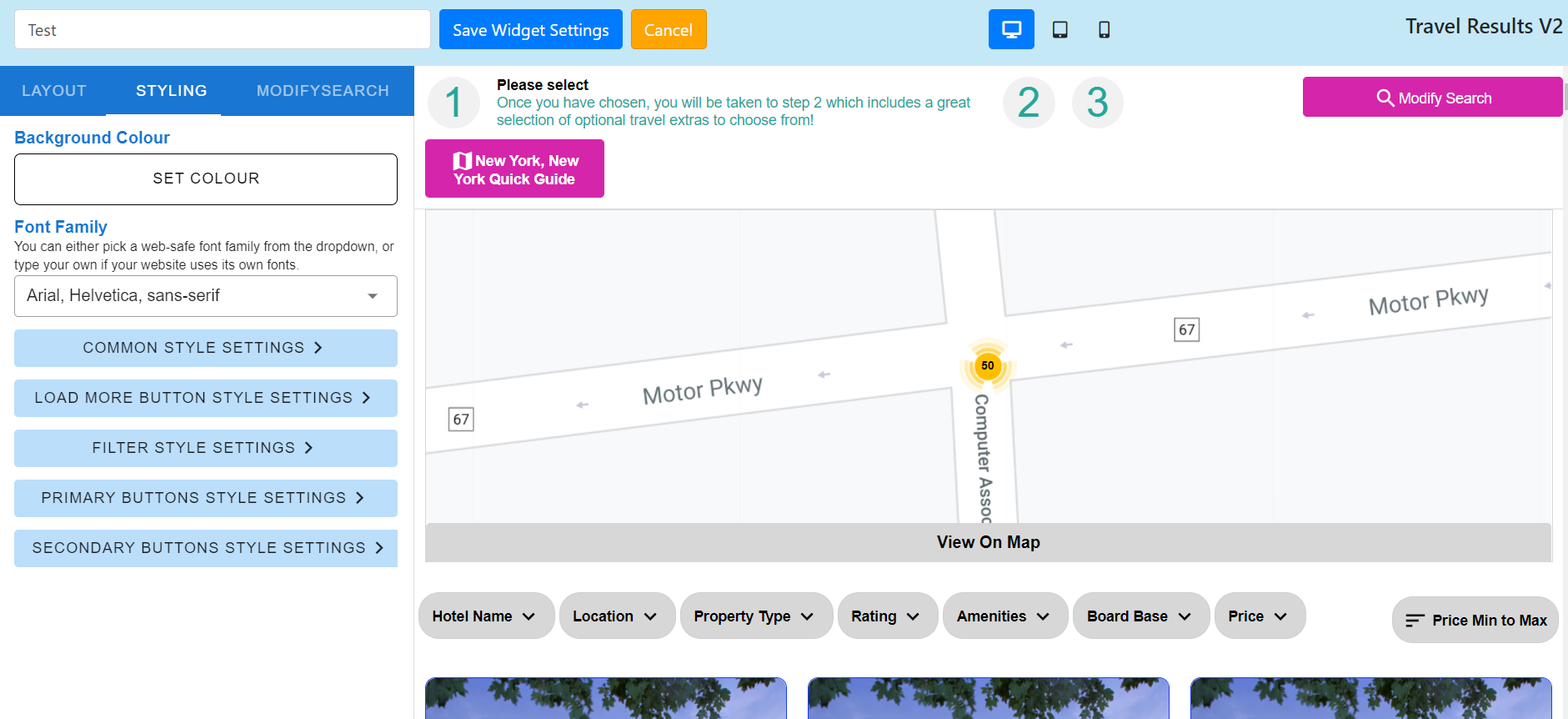
Once you have configured the layout for all product types, click Styling from the header menu on the left. This allows you to manage the common style settings that apply across the widget.
- Background colour
- Font family
- Common Style Settings
- Main Card Border Radius (px)
- Main Card Border Colour
- Main Card Border (px)
- Main Card Background Colour
- Main Card Star Rating Colour
- Main Card Star Rating Size
- Main Card Title Text Colour
- Main Card Title Text Size (px)
- Main Card Title Text Style
- Main Card Description and other Text Colour
- Main Card Description and other Text Size (px)
- Main Card Description and other Text Style
- Main Card Small Text Colour
- Main Card Small Text Size (px)
- Main Card Small Text Style
- Main Card Pricing Colour
- Main Card Pricing Text Size (px)
- Main Card Pricing Text Style
- Main Card Small Pricing Colour
- Main Card Small Pricing Text Size (px)
- Main Card Small Pricing Text Style
- Main Card SVG Icons Colour
- Main Card SVG Icons Size (px)
- Main Card Read More Text Colour
- Main Card Read Less Text Colour
- Load More Button Style Settings
- Button Background Colour
- Button Border Radius
- Button Padding
- Text Colour
- Text Size (px)
- Text Style
- Filter Style Settings
- Background Colour
- Background Menu Colour
- Border Radius
- Border
- Border Colour
- Padding
- Text Colour
- Text Size (px)
- Text Style
- Heading Text Colour
- Heading Text Size (px)
- Heading Text Style
- Filter Active Background Colour
- Checkbox/Radio Button Background Colour
- Checkbox/Radio Button Background Hover Colour
- Filter Text Size (px)
- Filter Text Style
- Dropdown Background Colour
- Dropdown Border Colour
- Dropdown Border
- Dropdown Border Radius
- Dropdown Desktop Size
- Slider Colour
- Primary Buttons Style Settings
- Button Background Colour
- Button Border Colour
- Button Text Colour
- Button Background Hover Colour
- Button Background Active Colour
- Button Border Radius (px)
- Button Border(px)
- Button Padding
- Text Size (px)
- Text Style
- Secondary Buttons Style Settings
- Button Background Colour
- Button Border Colour
- Button Text Colour
- Button Background Hover Colour
- Button Background Active Colour
- Button Border Radius (px)
- Button Border(px)
- Button Padding
- Text Size (px)
- Text Style
4.
Once you have configured the styling, click the Modify Search button from the navigation on the left the page. This lets you configure the modify search box that appears on the results page.
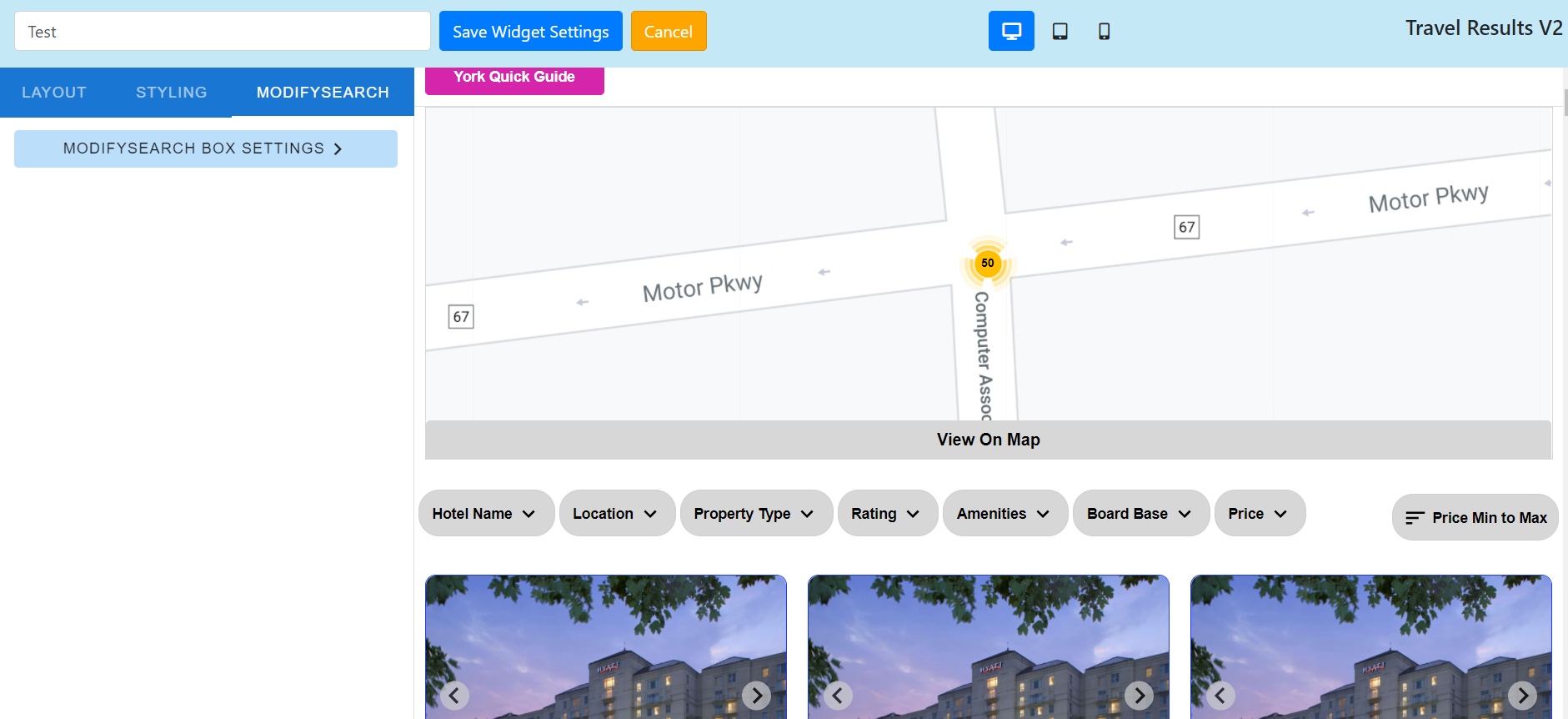
- Modify Search Box Settings
- Calendar type
- Single
- Range
- Number of months
- Calendar style
- Border radius
- Border width
- Border colour
- Background colour
- Heading colour
- Text colour
- Highlight colour
- Span colour
- Number colour
- Font size
- Text colour
- Icon colour
- Background colour
- List hover background colour
- Modal buttons text colour
- Modal buttons background colour
- Modal buttons border radius
- Modal buttons font size
- Modal buttons border colour
- Modal buttons border width
- Modal buttons hover background colour
- Modal Buttons Hover Text Colour
- Modal Background Colour
- Modal Border Radius
- Modal Text Colour
- Modal Border Width
- Modal Border Colour
- Disabled Button Styles
- Disabled button font size
- Disabled button background colour
- Disabled button text colour
- Disabled button border radius
- Disabled button border colour
- Disabled button border width
- Disabled button hover background colour
- Disabled button hover text colour
- Heading and pills styles
- Heading text colour
- Heading font size
- Heading background colour
- Heading hover background colour
- Heading hover text colour
- Pills Styles
- Pills font size
- Pills text colour
- Pills background colour
- Pills hover background colour
- Pills hover text colour
- Pills border radius
- Pills border width
- Pills border colour
- Label settings
- Flights tab label
- Location labels
- Flying from label
- Flying from placeholder
- Flying to
- Flying to placeholder
- Date field labels
- Depart date label
- Depart date placeholder
- Return date label
- Return date placeholder
- Location labels
- Accommodation tab label
- Location labels
- Location label
- Location placeholder label
- Date field labels
- Check in date
- Check in date placeholder
- Check out date
- Check out date placeholder
- Location labels
- Flight+Hotel tab label
- Location labels
- Destination
- Destination placeholder
- Loction
- Location placeholder
- Date field labels
- Check in date
- Check in date placeholder
- Check out date
- Check out date placeholder
- Location labels
- Car rental tab label
- Location labels
- Pickup location
- Pickup location placeholder
- Drop off location
- Drop off location placeholder
- Date field labels
- Pick up date
- Pick up placeholder
- Pick up time
- Pick up time placeholder
- Drop off date
- Drop off date placeholder
- Drop off time
- Drop off time placeholder
- Description Text
- Location labels
- Tickets and attractions tab label
- Location labels
- Destination of hotel name
- Location placeholder
- Date field labels
- From date
- From date placeholder
- To date
- To date placeholder
- Location labels
- Taxi and transfers tab label
- Location Labels
- Pickup location
- Pickup location placeholder
- Drop off location
- Drop off location placeholder
- Date field labels
- Outbound pick up date
- Outbound pick up date placeholder
- Outbound pick up time
- Out departure time placeholder
- Return pick up date
- Return pick up date placeholder
- Return departure time
- Return pickup time placeholder
- Location Labels
- Airport and extras tab label
- Location labels
- Flying from
- Flying from placeholder
- Flying to
- Flying to placeholder
- Date field labels
- Out departure date
- Out departure date placeholder
- Out departure time
- Out departure time placeholder
- Return departure date
- Return departure date placeholder
- Return arrival date
- Return arrival date placeholder
- Return arrival time
- Return arrival time placeholder
- Location labels
- Flights tab label
- Calendar type
Once you have configured your results widget, you are ready to add it to your website.
Comments
0 comments
Article is closed for comments.